Blog · Product Update · Endurance Signals · Fueling Sense
Endurance Signals and Fueling Sense update: 27 November 2026
Adjust a week with AI inside limits set in code, day notes, merging and comparing duplicate recordings, a pacing split, and one load per session.

Dr Graeme Stewart
· 3 min read
Key points
- New Calendar tool: "Adjust with AI" reshapes the rest of this week, or next week, inside limits set in code.
- Each day on the Calendar has its own menu: add a note, or cut, copy and paste the whole day.
- Two recordings of one session can now be merged or compared.
- Every completed session has one load, and the page says where it came from.
- One Fueling Sense fix: saving results.
Another Calendar-heavy week in Endurance Signals, which is still in a closed trial.
New
- Adjust with AI (coaches and self-coached athletes). A new week tool on the Calendar, for this week or next week. Tick what matters: today's HRV status, a sensible progression from last week, your usual schedule, or a request in your own words. Code sets the limits and works out every duration and load. The AI only chooses from a fixed list of changes and gives a reason for each. You see a preview and nothing changes until you apply it. Past days, completed sessions and race days are never touched.
- Day menu (athletes and coaches). Each Calendar day has a menu. "Add note" records what the day can hold, such as an appointment that leaves room for one session only, and AI features read it as a constraint. A coach can mark a note Private. You can also cut, copy and paste a whole day.
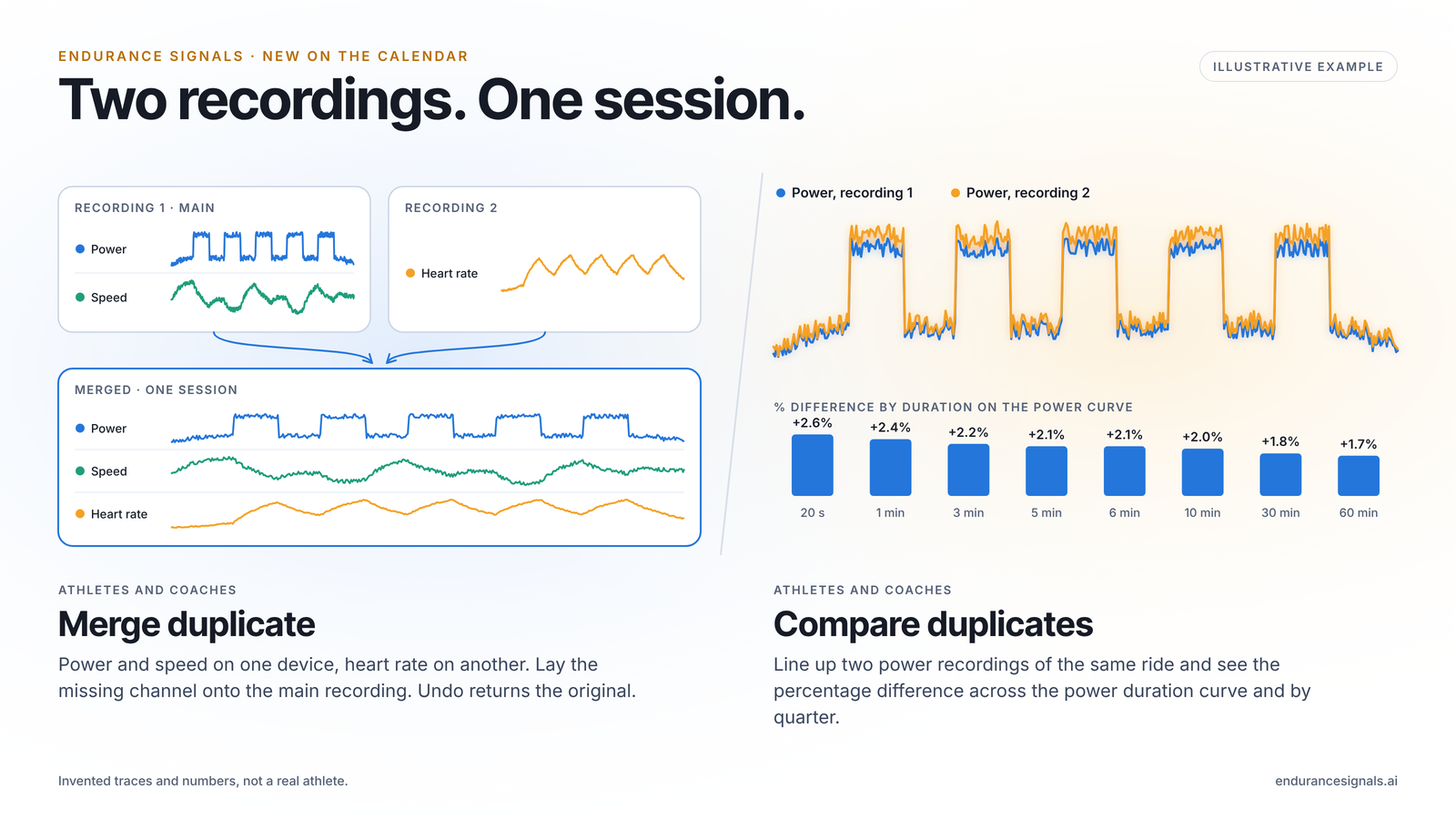
- Merge duplicate (athletes and coaches). If heart rate was logged on one device and power on another, you can lay the missing channels onto the main recording. Undo returns the original.
- Compare duplicates (athletes and coaches). Line up two power recordings of the same ride and see the percentage difference across the power duration curve and by quarter.
- Pacing split (athletes and coaches). The workout analysis page now shows each session in quarters and says whether it was evenly paced.
- Extra recipients (club admins). Upload a CSV or text file, or paste addresses, for people who should get club emails but are not on the roster.
Improved
- One load per session. The Calendar, compliance and trends now all use the same load, and it is labelled: from power, pace, heart rate or intervals.icu.
- Compliance. It now says what it graded on. A bike session with no power meter is no longer marked against power targets.
- Week totals. A session with no intensity data no longer counts as zero load. The total says how many sessions it covers, and the session says why it has no load.
- Week tools. "Cut week" joins Copy week. Pasting a week now adds to the target week and never replaces what is there.
- Metabolic charts. Fat and carbohydrate in grams per hour are drawn as separate curves, not stacked.
- HRV Advisor (coaches). Advice now takes day-to-day variability into account, alongside baseline and resting heart rate.
Fixed
- Dragging a workout family from the library added its default length, not the one you picked.
- A workout debrief could be refused when the moving time was written as minutes and seconds.
- A second copy of an activity with no power or heart rate could take the planned session from the full recording. Copies are now flagged and left unpaired.
Fueling Sense
- Saving results in Fueling Sense failed with an error for some signed-in accounts. Fixed, and affected accounts repair themselves on the next save.
Questions about any of these changes? Join the Endurance Signals community on Skool.
More from the blog
- 25 November 2026Fatmax and LT1: how we estimate them and how we train with them
- 23 November 2026AI in endurance sport: week of 23 November 2026